영한킴: spring MVC (3) : Spring MVC의 기본기능
이 포스트는 강의 내용에 관한 노트나 필자가 코딩한 것을 기록했습니다
Spring MVC의 기본기능
Logging
- log를 통해서 출력하면 아래의 정보가 모두 출력된다
2021-08-08 21:28:51.731 INFO 25792 --- [nio-8080-exec-2] hello.springmvc.basic.LogTestController : info log=Spring
- 디버깅하기 용이
- 성능상 좋음
- 파일로 저장 가능
로그레벨 : TRACE > DEBUG > INFO > WARN > ERROR
오른쪽으로 갈 수록 심각한 것이다..
보통 운영에서는 INFO, 개발환경에서는 DEBUG로 한다
@Controller는 뷰를 찾고 랜더링한다@RestController는HTTP 메시지 바디에 바로 입력한다
log.info("info log="+ name);
와 같은 코드는 성능상 좋지 않다.. 로깅레벨을 판단하기도 전 이전에.. 문자열 연산이 일어난다
    if(log.isTraceEnabled()) {
        log.trace("trace log=" + name);
    }
옛날엔 위와 같은 코드를 사용하기도 했었다 한다
Path Variable
이렇게 많이 사용한다 !!
@GetMapping("/mapping/users/{userId}/orders/{orderId}")
    public String mappingPath(@PathVariable String userId, @PathVariable("orderId") Long orderNum) {
        log.info("mappingPath userId = {}, orderId = {}", userId, orderNum);
        return "ok";
    }
변수명과 경로변수가 같을시 어노테이션 값 생략 가능
스프링은메서드의 타입이 일치하지 않을시 굉장히 직관적인 로그를 보여준다
Resolved [org.springframework.web.method.annotation.MethodArgumentTypeMismatchException: Failed to convert value of type 'java.lang.String' to required type 'java.lang.Long'; nested exception is java.lang.NumberFormatException: For input string: "120L"]
Resolved [org.springframework.web.HttpRequestMethodNotSupportedException: Request method 'GET' not supported]
- 406 Not Acceptable 은.. 클라이언트단에서 허용하지 않는 방식이란 뜻
.. 감동적!
만일 포스트맨의 Accept가
text/html이면 html로 내려주고
*/*이면 json으로 내려준다
API 예시
@RequestMapping("mapping/users")
@RestController
public class MappingClassController {

    @GetMapping
    public String user() {
        return "get users";
    }

    @PostMapping
    public String addUser() {
        return "post user";
    }

    @GetMapping("{userId}")
    public String user(@PathVariable String userId) {
        return "get user = " + userId;
    }

    @PatchMapping("{userId}")
    public String updateUser(@PathVariable String userId) {
        return "update user = " + userId;
    }

    @DeleteMapping("{userId}")
    public String deleteUser(@PathVariable String userId) {
        return "delete user = " + userId;
    }
}
MultiValueMap
@RequestHeader MultiValueMap<String, String> headerMap
- 키 이름은 동일한데, 여러 값을 받을 때
@CookieValue
@CookieValue(value = "myCookie", required = false) String cookie
- 쿠키 조회
@RequestParam
메서드_내부(
  @RequestParam(required = true, defaultValue = "guest") String username
) {...}
defaultValue가 설정이 되어있으면 값이 없어도 셋팅이 되기 떄문에required옵션 불필요- null이 아닌 공백으로 요청해도 기본값으로 셋팅된다
@RequestParam은 생략 가능하다
@ModelAttribute
메서드_내부(
  @ModelAttribute HelloData helloData
) {...}
- 요청이
?username=hello&age=20이렇게 올때 바인딩할 수 있다 @ModelAttribute는 생략 가능하다
@RequestBody
메서드_내부(@RequestBody HelloData helloData) {...}
- 요청이
{"username": "swcho", "age":"29"}와 같은 JSON으로 왔을때 대응(바인딩) 가능 @RequestBody는 생략 불가- 생략할 경우
@ModelAttribute로 바인딩 된다
- 생략할 경우
HttpMessageConverter의 구현체인MappingJackson2HttpMessageConverter가 사용된다
@ResponseBody
HttpEntity<HelloData> 메서드() {
  ...
  return new HttpEntity<>(helloData); // 타입 생략한건 반환타입에 의해 제네릭 추론이 가능하기 때문이라는 생각..
}
- 응답할 때도
HttpMessageConverter가 Json 바인딩해서 Http바디에 입력한다
응답
ResponseEntity
- 정적리소스
- 뷰 템플릿
- HTTP API
- HttpMessageConverter
- String
- JSON
- Byte
- XML
- HttpMessageConverter
@GetMapping("/response-body-json-v1")
public ResponseEntity<HelloData> responseBodyJsonV1() {
    HelloData helloData = new HelloData("userA", 20);
    return new ResponseEntity<>(helloData, HttpStatus.OK);
}
- 아래보다는 코드가 좀더 들어가지만 경우에 따라
HttpStatus를 사용할 수 있다- if문 등으로 분기 가능
@ResponseBody
@ResponseStatus(HttpStatus.OK)
@ResponseBody
@GetMapping("/response-body-json-v2")
public HelloData responseBodyJsonV2() {
    HelloData helloData = new HelloData("userA", 20);
    return helloData;
}
- 이 방식을 좀 더 많이 쓰긴한다고 한다.
- Status값을 직접 넣고자 할 때는
@ResponseStatus를 사용한다
기타 등등
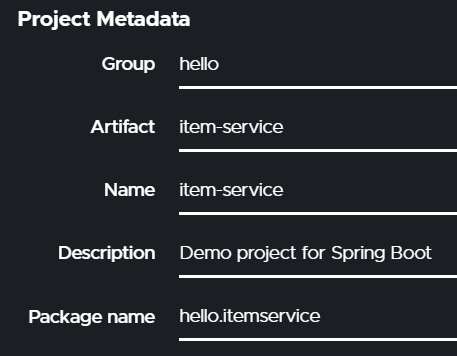
- package name에는 가급적
-등의 특수기호를 넣지 않는다
롬복의
@Data는 핵심 도메인 모델에 사용하기에는 굉장히 위험하다- @ToString.. 등등이 모두 선언되어 있고 예측하지 못한 동작을 할 수 있다
- 데이터를 옮기는
DTO정도에서는.. 사용해도 괜찮다고 한다
스프링처럼 멀티쓰레드 환경에서는
HashMap을 사용해서는 아니 된다ConcurrentHashMap을 사용long->AtomicLong
update시 Item 보다는 ItemParamDto를 만들어서 update할 대상을 명확히하자
- 중복과 명확성에서는 명확성을 선택하자
강의의 bootstrap은
resources/static/css/에 놓았다- 적용여부는
http://localhost:8080/css/bootstrap.min.css로 확인하자
- 적용여부는
만일 생성/수정한 정적 리소스 파일이 먹히지 않으면 out폴더를 지워라!
- out폴더는 정적리소스 등의 빌드 된 파일을 캐시하는 곳이다
정적 리소스 확인법
- #1
copy/path에서absolute path- 예) file:///C:/IDEs/IntelliJ_workspace/yhkim-mvc1-part3-item-service/src/main/resources/static/html/item.html
- #2 서버를 띄운 후 서버에서 제공하는 정적리소스 경로
- 예) http://localhost:8080/html/items.html
- #1
부트의 정적 리소스는
GET으로 받는다.. 아래와 같이POST는 막힌다<form action="item.html" method="post">
실제 서비스 운영상에서는 위와 같은 불필요한 html을 노출하면 안된다!
resources/static등의 폴더에 넣으면 공개된다 !
thymeleaf
${item.id}프로퍼티 접근 item.getId링크 문법
<link
  th:href="@{/css/bootstrap.min.css}"
  href="../css/bootstrap.min.css"
  rel="stylesheet"
/>>
- 위와 같이
@{...}가 붙어야 내부에 id를 치환하는 등의 기능이 가능해진다
<a th:href="@{/basic/items/${itemId}(itemId=${item.id})}"> </a>
- 경로변수를 주고자 할 때는 위처럼 한다
<td>
  <a
    href="item.html"
    th:href="@{/basic/items/{itemId}(itemId=${item.id}, query='foo')}"
    th:text="${item.id}"
    >회원id</a
  >
</td>
- querystring 도 같이 줄 때
<tr th:each="item : ${items}">
  <!--                <td><a href="item.html" th:href="@{/basic/items/{itemId}(itemId=${item.id})}" th:text="${item.id}">회원id</a></td>-->
  <td>
    <a
      href="item.html"
      th:href="@{/basic/items/{itemId}(itemId=${item.id}, query='foo')}"
      th:text="${item.id}"
      >회원id</a
    >
  </td>
  <!--                <td><a href="item.html" th:href="@{/basic/items/{itemId}(itemId=${item.id})}" th:text="${item.itemName}">상품명</a></td>-->
  <td>
    <a
      href="item.html"
      th:href="@{|/basic/items/${item.id}|}"
      th:text="${item.itemName}"
      >상품명</a
    >
  </td>
  <td th:text="${item.price}">10000</td>
  <td th:text="${item.quantity}">10</td>
</tr>
- for-each 문이다
PRG
- post로 요청했던 마지막 요청기록이 남아 있는 상태에서.. 새로고침을 한다면..?
- 등록이 계속 되어진다..
- 새로고침은 마지막으로 했던 요청을 다시 하는 것
- redirect:R 을 써서 새로고침시 CUD되는 것을 막자 !!

진짜가 되기 위한 가짜개발자 헤더부터 푸터까지!