Java 어댑터 패턴
어댑터 패턴
어댑터 패턴 공부/구현한 것 !
모든 코드는 깃허브에 있습니다 !!
https://github.com/progress0407/intelliJ-pure-java-proejct/tree/main/src/designpattern/adapter/n1
- 서로 다른 객체의 호환성을 위해서 만들어진 것
- 예를들어 각 회사의 다른 구현 클래스가 있고 사용자는 API를 사용할 때 내부사정을 모르고 사용할 수 있게 해야 한다.
- 또한 각회사들 또한 자신들의 코드를 수정하지 않고 구현할 수 있어야 한다.
- 즉 사용자와 각 회사 모두의 코드를 수정하지 아니하고 유지보수 가능해야 한다
- 여기서의 사용자의 영역은 MyMain의 main함수와 인접한 AdapterPlayer 인터페이스
- 각 회사는 Music과 Video 클래스이다
- 각 회사는 심지어 변수 뿐만 아니라 main함수에서 실행될 메서드 시그니쳐가 모두 다르다
- 오로지 AdpaterImple이라는 구현체만을 수정해서 유지보수할 수 있는 상황을 만들어 보았다.
public class MyMain {
    public static void main(String[] args) {
        Music music = new Music("너말고 니언니", "mp3", "320");
        PlayerAdapter player = new PlayerAdapterImpl(music);
        player.play();

        System.out.println("_________________________________________________");

        Video video = new Video("센치의 행방불명", "mkv", 1080, 29.7F);
        PlayerAdapter player2 = new PlayerAdapterImpl(video);
        player2.play();

        System.out.println("_________________________________________________");
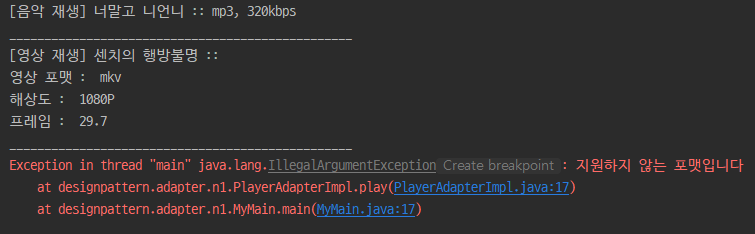
        PlayerAdapter player3 = new PlayerAdapterImpl(new Object());
        player3.play();
    }
}
- 출력결과
public class Music {

    private String albumName;
    private String audioFormat;
    private String soundQuality;

    public Music(String albumName, String audioFormat, String soundQuality) {
        this.albumName = albumName;
        this.audioFormat = audioFormat;
        this.soundQuality = soundQuality + "kbps";
    }

    public void playMusic() {
        System.out.printf("[음악 재생] %s :: %s, %s \n", albumName, audioFormat, soundQuality);
    }
}
public class Video {

    private String movieName;
    private String videoFormat;
    private int videoResolution;
    private Float videoFrame;

    public Video(String movieName, String videoFormat, int videoResolution, Float videoFrame) {
        this.movieName = movieName;
        this.videoFormat = videoFormat;
        this.videoResolution = videoResolution;
        this.videoFrame = videoFrame;
    }

    public void playMovie() {
        System.out.printf("[영상 재생] %s ::\n", movieName);
        System.out.println("영상 포맷 :  " + videoFormat);
        System.out.printf("해상도 :  %dP\n",  videoResolution);
        System.out.printf("프레임 :  %.1f\n", videoFrame);
    }
}
public interface PlayerAdapter {
    void play();
}
public class PlayerAdapterImpl implements PlayerAdapter{

    private Object something;

    public PlayerAdapterImpl(Object something) {
        this.something = something;
    }

    public void play() {
        if(something instanceof Music) {
            ((Music) something).playMusic();
        } else if (something instanceof Video) {
            ((Video)something).playMovie();
        } else {
            throw new IllegalArgumentException("지원하지 않는 포맷입니다");
        }
    }
}
- 만일 Music, Video 이외의 제 3의 클래스가 추가된다면 어댑터구현체의 play메서드만을 수정하면 된다
참고
https://yaboong.github.io/design-pattern/2018/10/15/adapter-pattern/
https://niceman.tistory.com/141
진짜가 되기 위한 가짜개발자 헤더부터 푸터까지!